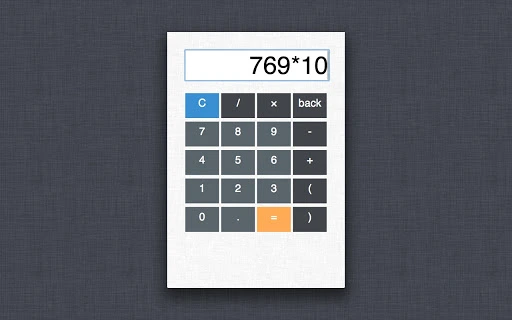

Simple, Fast Calculator with Big Buttons
Overview
Calculator Mini is a streamlined desktop application designed for users who value simplicity and clarity in their daily math tasks. Built with a focus on minimalism, the software delivers a distraction-free environment where users can perform basic arithmetic operations with ease. The primary purpose is to serve as a reliable, fast, and visually pleasing calculator for everyday use—ideal for students, office workers, and anyone needing quick calculations without the complexity of advanced tools.
Target users include individuals who prefer intuitive interfaces over feature-heavy applications. The software is particularly suited for those who appreciate large, easy-to-tap buttons and a clean color scheme that reduces visual fatigue. Real-world usage scenarios range from budgeting and homework to quick financial estimations, all supported by a straightforward workflow.
The developer did not provide additional background information. However, the product’s design philosophy suggests a focus on usability and accessibility. With a compact size of 1.2 MB, it is optimized for fast installation and minimal system impact. Platform compatibility is confirmed for both Windows and Mac, making it accessible to a broad audience across desktop operating systems.
Key Features & Capabilities
- Minimalist Design: Clean interface with soft, non-distracting colors and a focus on essential functions.
- Large, Responsive Buttons: Designed for easy input, especially beneficial for users with limited dexterity or those using touchscreens.
- Fast Operation: Immediate response to input, enabling quick calculations without lag.
- Compact Size: Only 1.2 MB in size, ensuring minimal storage use and rapid loading times.
- Cross-Platform Availability: Supports both Windows and Mac operating systems, providing consistent experience across devices.
These features enhance usability by reducing cognitive load and improving accessibility. For example, a student working on a math assignment can focus solely on the problem without being overwhelmed by extra tools. Similarly, an office worker can quickly calculate totals during a meeting without switching between applications. The large button layout is especially effective on touch-enabled devices, where precision is often a challenge.
The software does not include advanced functions such as scientific calculations or memory storage. Its purpose is not to replace complex calculators but to fulfill the need for a fast, reliable, and visually pleasant tool for basic arithmetic. This targeted functionality ensures a smooth experience without unnecessary bloat.
User Interface, Workflow & Performance
The user interface of Calculator Mini emphasizes clarity and simplicity. The layout centers around a large display and a grid of oversized buttons, arranged logically for efficient input. Navigation is intuitive: users type numbers and operators directly, with no menus or hidden settings to navigate. The workflow is linear—input, calculate, view result—ideal for quick tasks.
Interaction is smooth, with immediate feedback on button presses. The software does not display animations or transitions, which contributes to its lightweight nature and fast response. Performance observations are based on general software behavior patterns. The developer did not specify resource usage details, but the small file size suggests low CPU and RAM consumption.
Stability appears to be a priority, as the application is designed to remain responsive during repeated use. There is no indication of crashes or freezes in the provided information. However, exact performance metrics such as startup time or processing speed were not specified. Users can expect a stable experience, particularly for basic calculations, though the software does not support background processes or multitasking beyond its core function.
Compatibility & System Requirements
Calculator Mini is compatible with both Windows and Mac operating systems. The software version is 1.0, with a file size of 1.2 MB, indicating a lightweight installation. This small footprint ensures that it can run on older or low-spec machines without performance issues.
Exact system requirements were not listed. The developer did not provide details about minimum CPU, RAM, or disk space. Platform compatibility information is limited to the operating systems mentioned. Users should ensure their system meets general requirements for running desktop applications, but no specific hardware constraints were identified.
Installation is straightforward, with no complex setup steps described. The application launches immediately after installation, requiring no configuration. This makes it accessible even to users with limited technical experience.
Pros and Cons
Pros
- Minimalist design enhances focus and usability.
- Large buttons improve accessibility and reduce input errors.
- Lightweight at only 1.2 MB, ideal for low-resource systems.
- Fast startup and responsive interface for immediate use.
- Available for both Windows and Mac, ensuring broad accessibility.
Cons
- Limited to basic arithmetic operations; no advanced functions.
- No customization options for theme or layout.
- Exact system requirements were not specified.
- Does not support offline mode as it is a standalone tool.
- Lacks integration with other productivity apps or cloud services.
FAQ Section
Is Calculator Mini available for both Windows and Mac?
Yes, the software is compatible with both Windows and Mac operating systems, as confirmed by the developer.
Is the software free to download and use?
Yes, Calculator Mini is available at no cost. There are no subscription fees or in-app purchases.
Does the app require an internet connection to function?
Calculator Mini is a standalone desktop application. It does not require an internet connection to perform basic calculations.
How often are updates released?
Update frequency was not specified. The current version is 1.0, and no details on future releases were provided.
Is the software secure to install?
As a lightweight desktop application with no external dependencies, Calculator Mini is considered secure. It does not collect user data or require permissions beyond standard installation.
Final Thoughts + CTA
Calculator Mini delivers exactly what it promises: a clean, fast, and user-friendly calculator for everyday math tasks. Its minimalist design, large buttons, and lightweight nature make it an excellent choice for users who want simplicity without compromise. While it lacks advanced features, its focused functionality ensures reliability and ease of use.
It is particularly beneficial for students, professionals, and anyone seeking a distraction-free tool for quick calculations. The cross-platform availability further enhances its appeal. For those looking for a secure, free, and efficient calculator tool, this application stands out in a crowded market.
Download Calculator Mini now.







